Have you ever sent a message on Google Messages and suddenly noticed one check mark, two check marks, or two filled check marks next to it?
If you are wondering what those little symbols actually mean, you are not alone. At first glance, they can be confusing, especially when you are trying to figure out whether your message was sent, delivered, or actually read.
The good news is that the check marks are designed to tell you exactly what is happening to your message.
In this guide, we will explain what the check marks mean on Google Messages, how they work with RCS chats, what it means when a message stays on one check, and why you may not see these icons with ordinary SMS texts.
What Do the Check Marks Mean on Google Messages?
On Google Messages, check marks can show the status of a message sent through RCS (Rich Communication Services).
In simple terms:
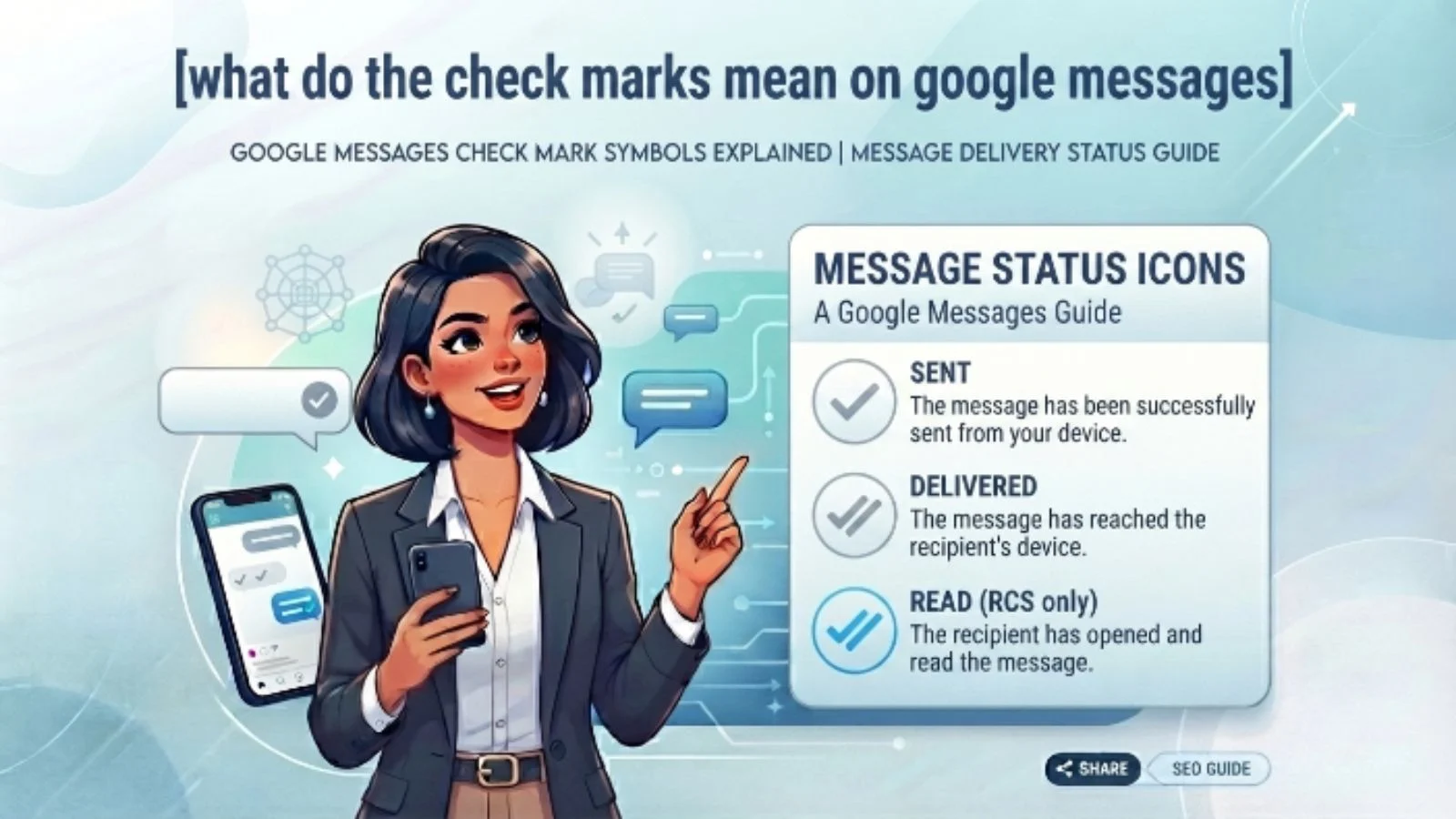
- One check mark means your message has been sent.
- Two check marks mean your message has been delivered.
- Two filled check marks mean your message has been read.
- A timer icon means the message is still being sent.
Google states that these status icons are used to show when an RCS message has been sent, delivered, and read. Importantly, these icons do not appear for standard SMS or MMS messages.
So, if you see check marks beside your message, you are generally dealing with an RCS conversation rather than a traditional SMS conversation.
What Does One Check Mark Mean?
A single check mark means your message has been sent.
Think of it as Google Messages saying:
“Your message has left your phone.”
However, a single check does not necessarily mean the other person’s phone has received the message yet.
The message has been successfully sent through the RCS system, but delivery has not yet been confirmed.
For example, imagine you send:
“Hey, are you free tonight?”
You see one check mark.
That means the message has been sent, but Google Messages has not yet confirmed that it reached the recipient’s device.
Why might it stay on one check?
Several things can affect delivery, including:
- The recipient has no internet connection.
- Their phone is turned off.
- They temporarily lost cellular or Wi-Fi service.
- RCS is having a connection problem.
- The recipient’s RCS service is temporarily unavailable.
Google notes that messages may not always be delivered immediately when either person loses cellular or internet service.
What Do Two Check Marks Mean?
When you see two check marks, your message has been delivered.
This is different from being read.
Two checks basically mean:
Sent → Delivered
The recipient’s device has received the message, but that does not automatically mean they have opened the conversation and looked at it.
For example:
You send:
“Can you call me when you’re free?”
The message changes from one check to two checks.
That tells you it has been delivered.
But if the person has not opened the conversation, you should not assume they have seen it.
This distinction is especially important when you are waiting for a reply.
What Do Filled Double Check Marks Mean?
This is the status people often care about most.
When the two check marks become filled, Google Messages indicates that the message has been read.
In other words:
Two check marks = Delivered
Filled two check marks = Read
Google’s documentation identifies the color-filled double-check icon as the indicator that your message has been read.
For example:
You send:
“Did you get home safely?”
You see two filled check marks.
That means the recipient has read the message.
It still does not mean they are going to respond immediately. Someone can read a message and reply later, or decide not to reply at all.
What Does the Timer Icon Mean?
You may occasionally see a timer icon instead of a check mark.
This means your message is still being sent.
It is essentially the first stage of the messaging process.
The basic progression can look like this:
Timer → One check → Two checks → Filled two checks
However, the exact appearance can vary slightly depending on your phone, app version, and interface.
If the timer remains for an unusually long time, your internet connection or RCS connection may be experiencing a problem.
Why Are There Check Marks on Google Messages?
The purpose of these icons is to give you more information about your message without requiring you to open a separate status screen.
Instead of wondering:
“Did my message go through?”
Google Messages can show you whether the message was:
- Being sent
- Sent
- Delivered
- Read
This is one of the features made possible by RCS messaging.
RCS provides features such as read receipts, typing indicators, high-resolution media sharing, and messaging over Wi-Fi or mobile data.
Do Check Marks Mean the Person Is Online?
No.
This is one of the most common misunderstandings.
A check mark does not necessarily tell you whether someone is currently online.
For example, if you see two checks, it means the message has been delivered. It does not mean the person is actively using their phone at that exact moment.
Likewise, a filled double check indicates that the message has been read, but it does not tell you what the person is doing afterward.
So avoid treating the check marks as a real-time online indicator.
Google Messages Check Marks vs SMS
One of the most important things to understand is that RCS and SMS are not the same thing.
| Status | RCS Google Messages | Standard SMS/MMS |
|---|---|---|
| Timer | Can appear | Not shown as an RCS status icon |
| One check | Sent | Not shown |
| Two checks | Delivered | Not shown |
| Filled two checks | Read | Not shown |
| Read receipts | Available with RCS | Not available in the same RCS system |
Google specifically says the sent, delivered, and read icons do not appear on SMS or MMS messages.
This explains why you might see check marks when texting one person but not another.
What Is RCS in Google Messages?
RCS stands for Rich Communication Services.
It is a modern messaging standard designed to provide more advanced features than traditional SMS and MMS.
With RCS, you can get features such as:
- Read receipts
- Typing indicators
- High-resolution photos and videos
- Messaging over Wi-Fi or mobile data
- More advanced group-chat features
- Certain security features
Google says RCS availability can depend on the device, carrier, region, and whether participants have RCS enabled.
That is why the Google Messages experience can differ from one conversation to another.
Real-Life Examples of Google Messages Check Marks
Example 1: One Check Mark
You text your friend:
“Are you coming to the party?”
You see:
One check mark
Meaning: Your message has been sent, but delivery has not yet been confirmed.
Your friend might have no internet connection or their phone might temporarily be unavailable.
Example 2: Two Check Marks
Later, the icon changes to:
Two check marks
Meaning: The message has been delivered.
The recipient’s device has received it, but you cannot conclude from this alone that they have read it.
Example 3: Filled Double Check Marks
The two checks become filled.
Meaning: Google Messages indicates that the message has been read.
If your friend does not reply immediately, however, that is a separate matter.
Example 4: Timer Icon
You send a message and notice a timer.
Meaning: The message is still trying to send.
If it stays that way, check your internet connection and RCS status.
Why Don’t I See Check Marks in Every Conversation?
There is a simple reason: not every conversation uses RCS.
Google explains that the status icons are not shown for SMS or MMS messages.
RCS also depends on availability and whether the participants in the conversation can use RCS.
For example, you may have RCS enabled, but another conversation could use standard SMS/MMS instead.
When that happens, you should not expect the same sent, delivered, and read check-mark system.
Can You Turn Read Receipts Off?
RCS includes read receipts, which can tell your contacts when you have read their messages.
If you prefer more privacy, Google Messages provides settings related to RCS and read receipts.
This is useful if you do not want every conversation to communicate whether you have opened a message.
Keep in mind that changing read-receipt settings can affect what you and your contacts see.
Does Two Check Marks Mean They Read My Message?
No.
This is probably the most important point to remember.
Two check marks mean the message has been delivered.
They do not necessarily mean it has been read.
A filled double-check indicator is what Google identifies as the read status.
So if you see two checks but no filled indication, do not automatically assume the person has opened the message.
Does a Read Receipt Mean They Will Reply?
Again, no.
A read receipt only tells you about the message’s status.
It does not tell you:
- Whether the person liked your message
- Whether they are going to reply
- Whether they are ignoring you
- Whether they are busy
- Whether they are thinking about what to say
If your message has been read and there is no response, the check mark itself cannot explain why.
This is especially important when messaging friends, family, coworkers, or someone you are getting to know.
Do not read too much emotion into a technical status indicator.
What If My Message Isn’t Delivered?
If an RCS message remains undelivered, Google Messages may continue trying to deliver it.
Google also provides an option to switch an undelivered message from RCS to SMS/MMS in supported situations.
You can also check your connection and RCS settings.
A good troubleshooting checklist is:
- Check your Wi-Fi or mobile data.
- Make sure Google Messages is updated.
- Check whether RCS is enabled.
- Verify your phone number if Google Messages requests it.
- Give the recipient time to reconnect.
- Try SMS/MMS if the RCS message cannot be delivered.
Common Misunderstandings About Google Messages Check Marks
“Two checks mean they are online.”
Not necessarily.
Two checks indicate delivery, not that the person is currently online.
“One check means they blocked me.”
Not necessarily.
A single check can happen for several technical reasons. It is not reliable proof that someone has blocked you.
“Two checks mean they read it.”
Not by themselves.
Two checks indicate delivery. The filled double-check status indicates that Google Messages has registered the message as read.
“Every Google Messages text has check marks.”
No.
Google says these icons apply to RCS messages and are not shown on SMS or MMS messages.
“Read means they will answer.”
Definitely not.
Read status and response behavior are two completely different things.
Pro Tips for Understanding Google Messages Status
1. Look at the type of conversation
If you are seeing RCS features such as typing indicators and read receipts, you are likely using an RCS conversation.
2. Don’t panic over one check
A single check does not automatically indicate a problem with your relationship or communication.
It can simply be a connection issue.
3. Don’t confuse delivered with read
This is the biggest mistake people make.
Remember:
Delivered does not equal read.
4. Check your internet connection
RCS uses Wi-Fi or mobile data, so connectivity can affect message delivery.
5. Remember that settings matter
Read receipts and other RCS features depend on the messaging setup of the conversation.
Final Thoughts
So, what do the check marks mean on Google Messages?
The answer is actually quite simple once you know the system.
A single check mark means your RCS message has been sent. Two check marks mean it has been delivered. Filled double check marks indicate that it has been read. A timer means the message is still being sent.
The important thing is not to confuse technical message status with someone’s behavior. A delivered message does not automatically mean it was read, and a read message does not guarantee a reply.
Once you understand these small symbols, Google Messages becomes much easier to use.
Frequently Asked Questions
What does one check mark mean on Google Messages?
One check mark means your RCS message has been sent. It does not necessarily mean the recipient has received or read it yet.
What do two check marks mean on Google Messages?
Two check marks mean your RCS message has been delivered to the recipient. They do not, by themselves, confirm that the person has read it.
What do filled check marks mean on Google Messages?
Filled double check marks indicate that your message has been read, according to Google’s Google Messages status indicators.
Why don’t I see check marks on my text messages?
The sent, delivered, and read check-mark icons are associated with RCS messaging and do not appear on standard SMS or MMS messages.
Can two check marks mean someone is ignoring me?
No. Two check marks only indicate that the message was delivered. They do not tell you why someone has or has not responded.
Do Google Messages check marks work with iPhone users?
RCS messaging can now work between Android and iPhone users where RCS is supported and enabled. Google says features such as typing indicators and read receipts are available in supported one-to-one RCS conversations.